

Build with BunyanPlayground
Compare Documents
Compare and analyze multiple documents by referencing them directly in the chat playground.
Using Document Comparison
- Open Playground.
- Select documents with the folder-shaped tools button, or type
@and choose each document from the suggestions. Typing a name as plain text does not select it. - Describe your task, clearly associating each document with its role in the comparison.
Tip
Positioning the document name in the sentence helps the model understand what task is related to which document.
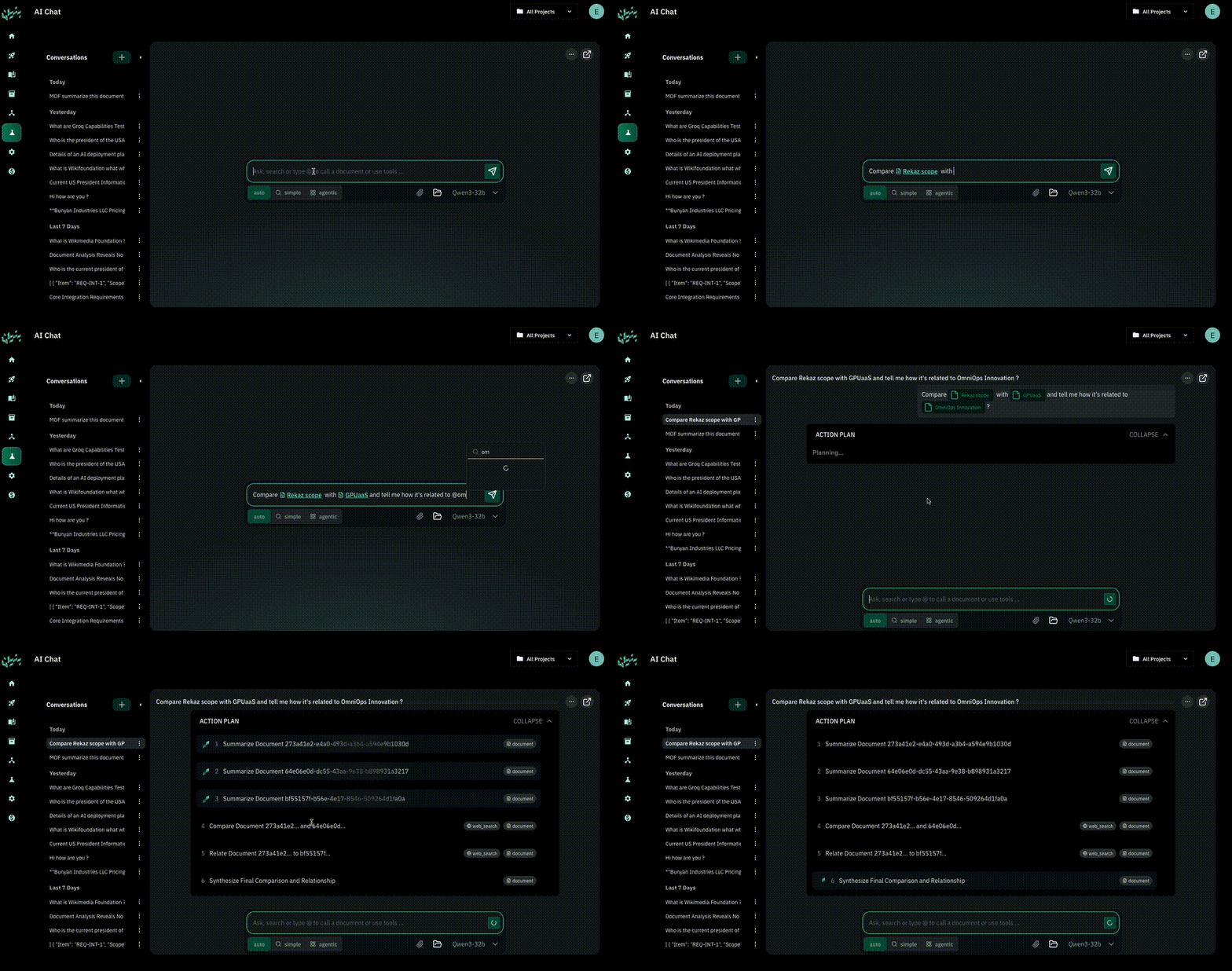
Example
Prompt:
Extract the scope of work from @RFP and the technical proposals from @proposal1 and @proposal2 and give me a synthesis.
Select your own documents in place of the example names.
Example comparison plan:
You can ask Bunyan to follow this plan. The actual tools and order of execution depend on the request and available sources.
| Step | Action | Dependencies |
|---|---|---|
| 1 | Extract scope of work from @RFP | — |
| 2 | Extract technical proposal from @proposal1 | — |
| 3 | Compare technical proposal to Step 1 output | Step 1, Step 2 |
| 4 | Extract technical proposal from @proposal2 | — |
| 5 | Compare technical proposal to Step 1 output | Step 1, Step 4 |
| 6 | Compare the two proposals | Step 3, Step 5 |
Review the comparison and its source references against the original documents, especially where a requirement is missing or ambiguous.