

Build with BunyanPlayground
Summarize Documents
The Playground makes it easy to generate summaries of your documents directly in the chat.
How to Summarize
Step 1: Open the Chat Playground
Navigate to the Playground to start a new conversation.
Step 2: Select Your Document
You have two options to specify which document to summarize:
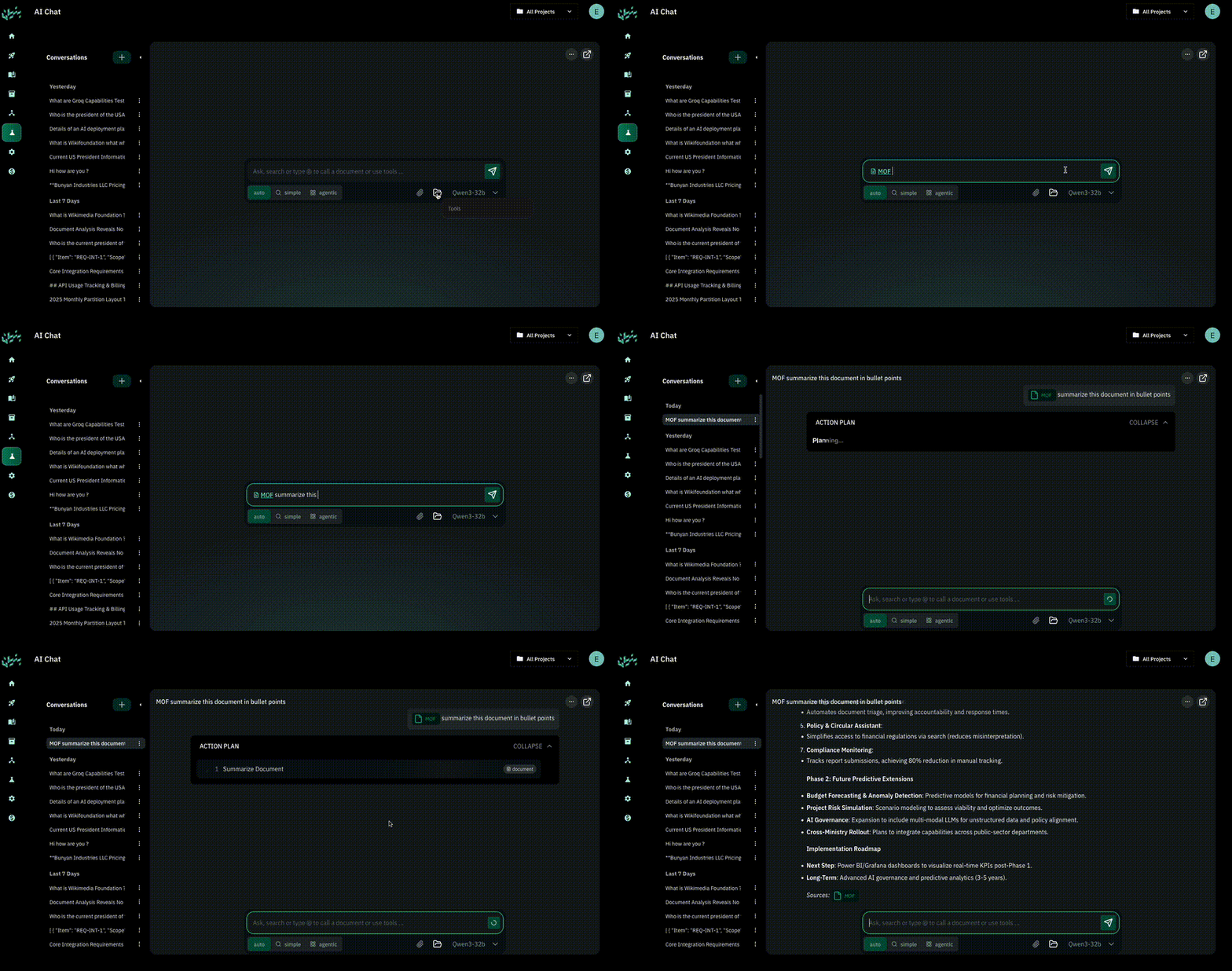
- Using the folder icon — Open the folder-shaped tools button below the message box, then find and select your document.
- Using the @ symbol — Type
@, search for the document, and select it from the suggestions. Typing its name as plain text does not select it.
Tip
Selecting the document is important — it helps the model understand exactly which document needs to be summarized.
Step 3: Ask for a Summary
Write your prompt asking the model to summarize the document.
Tip
In your prompt, you can ask for a brief summary or a detailed summary, which will control how long or short the answer is.
Example prompt:
Summarize this document for me in bullet points @RFPReplace @RFP with a document selected from your own sources. Review the summary against the original document and ask for source passages when you need to check a detail.